Jupter notebook demostration
1. Using tab for searching (modules, attribues ...etc)
2. Auotmatic print out the last line in each ecll
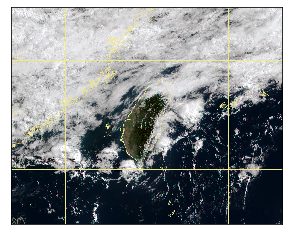
Himwari pic
[1]:
import cwbplot.IO_himawari_tools as tools
import  matplotlib.pyplot as plt
[2]:
out=tools.HIMAWARI('202105250000')
print(type(out))
type(out)
<class 'cwbplot.IO_himawari_tools.HIMAWARI'>
[2]:
cwbplot.IO_himawari_tools.HIMAWARI
[3]:
# show object info
#
[4]:
## get projection info of himawari
bm=out.get_basemap()
bm.imshow(out.data_rgb)
[4]:
<matplotlib.image.AxesImage at 0x7fc546b6ef28>
XML file
[6]:
import cwbplot.tools as tool
[8]:
## how to use
print(tool.read_xml_cwb.__doc__)
  read_xml_cwb(data_time_str,var_list,prefix='')
     data_time_str: string format(YYYYMMDDHHNN) in UTC
[9]:
## Introduce pandas format
out=tool.read_xml_cwb('202105250000','ELEV WSPD WDIR HUMD')
out
[9]:
| lat | lon | ELEV | WDIR | HUMD | |
|---|---|---|---|---|---|
| 466940 | 25.133314 | 121.740475 | 26.7 | 30.0 | 1.00 |
| 466900 | 25.164889 | 121.448906 | 19.0 | 300.0 | 0.82 |
| 466880 | 24.997647 | 121.442017 | 11.0 | 60.0 | 0.80 |
| 466930 | 25.162078 | 121.544547 | 607.1 | 200.0 | 0.98 |
| 466910 | 25.182586 | 121.529731 | 832.6 | 210.0 | 1.00 |
| ... | ... | ... | ... | ... | ... |
| C0M800 | 23.299075 | 120.664767 | 440.0 | 0.0 | 0.67 |
| C0K560 | 23.686450 | 120.603417 | 117.0 | 0.0 | 0.70 |
| C0K550 | 23.514319 | 120.229736 | 15.0 | 42.0 | 0.73 |
| C0X290 | 23.267772 | 120.125481 | 10.0 | 27.0 | 0.81 |
| C0X310 | 23.147289 | 120.086253 | 9.0 | 19.0 | 0.75 |
529 rows × 5 columns
[10]:
out.insert(0,'yyyymmddhhnn','202105250000')
out
[10]:
| yyyymmddhhnn | lat | lon | ELEV | WDIR | HUMD | |
|---|---|---|---|---|---|---|
| 466940 | 202105250000 | 25.133314 | 121.740475 | 26.7 | 30.0 | 1.00 |
| 466900 | 202105250000 | 25.164889 | 121.448906 | 19.0 | 300.0 | 0.82 |
| 466880 | 202105250000 | 24.997647 | 121.442017 | 11.0 | 60.0 | 0.80 |
| 466930 | 202105250000 | 25.162078 | 121.544547 | 607.1 | 200.0 | 0.98 |
| 466910 | 202105250000 | 25.182586 | 121.529731 | 832.6 | 210.0 | 1.00 |
| ... | ... | ... | ... | ... | ... | ... |
| C0M800 | 202105250000 | 23.299075 | 120.664767 | 440.0 | 0.0 | 0.67 |
| C0K560 | 202105250000 | 23.686450 | 120.603417 | 117.0 | 0.0 | 0.70 |
| C0K550 | 202105250000 | 23.514319 | 120.229736 | 15.0 | 42.0 | 0.73 |
| C0X290 | 202105250000 | 23.267772 | 120.125481 | 10.0 | 27.0 | 0.81 |
| C0X310 | 202105250000 | 23.147289 | 120.086253 | 9.0 | 19.0 | 0.75 |
529 rows × 6 columns
[11]:
out[['lat','lon','ELEV']]
[11]:
| lat | lon | ELEV | |
|---|---|---|---|
| 466940 | 25.133314 | 121.740475 | 26.7 |
| 466900 | 25.164889 | 121.448906 | 19.0 |
| 466880 | 24.997647 | 121.442017 | 11.0 |
| 466930 | 25.162078 | 121.544547 | 607.1 |
| 466910 | 25.182586 | 121.529731 | 832.6 |
| ... | ... | ... | ... |
| C0M800 | 23.299075 | 120.664767 | 440.0 |
| C0K560 | 23.686450 | 120.603417 | 117.0 |
| C0K550 | 23.514319 | 120.229736 | 15.0 |
| C0X290 | 23.267772 | 120.125481 | 10.0 |
| C0X310 | 23.147289 | 120.086253 | 9.0 |
529 rows × 3 columns
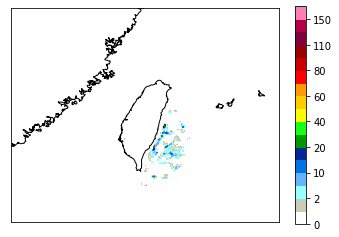
QPE file
[5]:
import cwbplot.IO_tools as tools
[6]:
QPE_dat='/IFS6/data2/datawrf/p108/QPESUMS/data/QPE_2D_2019012800.dat'
[7]:
out=tools.QPE_2D_READ(QPE_dat)
bm.drawcoastlines()
bm.contourf(out.lon,out.lat,out(),**out.cwbcolorbar(),latlon=True)
plt.colorbar()
[7]:
<matplotlib.colorbar.Colorbar at 0x7fc5469a1a58>
Radar CV
[10]:
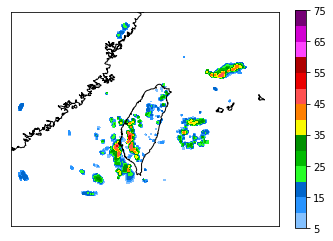
compress_dat='/IFS6/data2/datarfs/c164/test_data/radar/COMPREF/COMPREF.20181123.0000'
compress_dat='/IFS6/data2/datarfs/c164/test_data/radar/COMPREF/CREF_030min.20210601.040000.gz'

out=tools.COMPREF_READ(compress_dat)
bm.drawcoastlines()
bm.contourf(out.lon,out.lat,out(),**out.cwbcolorbar(),latlon=True)
plt.colorbar()
print(out)
unzip files
CWB CREF binary format([('', '<i2')])
TIME:Tue Jun  1 04:00:00 2021
DIMX,DIMY,DIMZ=1501,1501,1
[16]:
%matplotlib inline
import cwbplot.plotwrfvar as pltwrf
import numpy as np
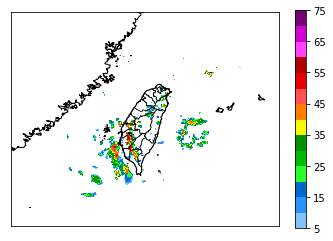
MREF_dat='/IFS6/data2/datarfs/c164/test_data/radar/MREF/MREF3D21L.20210601.0400.gz'
#MREF_dat='/IFS6/data2/datarfs/c164/test_data/radar/MREF/MREF3D30L.20200212.0000'

out=tools.COMPREF_READ(MREF_dat)
print(out)
print('-------colorbar')
print(out.cwbcolorbar()['levels'])

pltwrf.state(bm)
#print((out.lat))
bm.drawcoastlines()
bm.contourf(out.lon,out.lat,np.max(out(),axis=2),**out.cwbcolorbar(),latlon=True)
#bm.pcolormesh(out.lon,out.lat,np.max(out(),axis=2),vmin=5,vmax=75,cmap=out.cwbcolorbar()['cmap'],latlon=True)
plt.colorbar()
unzip files
CWB mosaicked refl binary format([('', '<i2')])
TIME:Tue Jun  1 04:00:00 2021
DIMX,DIMY,DIMZ=441,561,21

-------colorbar
[5, 10, 15, 20, 25, 30, 35, 40, 45, 50, 55, 60, 65, 70, 75]
[16]:
<matplotlib.colorbar.Colorbar at 0x7fc54440dda0>
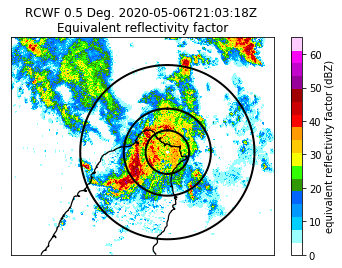
Radar Sweep
[19]:
import cwbplot.cwb_radar_all as cwb_ra
from pyart.graph import RadarMapDisplayBasemap
import matplotlib.colors as mcolors
import matplotlib.pyplot as plt
import numpy as np
## You are using the Python ARM Radar Toolkit (Py-ART), an open source
## library for working with weather radar data. Py-ART is partly
## supported by the U.S. Department of Energy as part of the Atmospheric
## Radiation Measurement (ARM) Climate Research Facility, an Office of
## Science user facility.
##
## If you use this software to prepare a publication, please cite:
##
##     JJ Helmus and SM Collis, JORS 2016, doi: 10.5334/jors.119
[20]:
fname="/IFS6/data2/datarfs/c164/test_data/radar/RCWF.20200506.2103.bref_raw.01"
radar = cwb_ra.read_cwb_radar_sweep(fname)
display1 = RadarMapDisplayBasemap(radar)
cwb_data=['None','#9BFFFF','#00CFFF','#0198FF','#0165FF','#309901','#32FF00','#F8FF00','#FFCB00','#FF9A00','#FA0300','#CC0003','#A00000','#98009A','#C304CC','#F805F3','#FECBFF']
cmap = mcolors.ListedColormap(cwb_data,'precipitation')
norm = mcolors.BoundaryNorm(list(range(0,66,5)), cmap.N)
display1.plot_ppi_map(list(radar.fields.keys())[0], sweep=0, resolution='h',
                         vmin=0, vmax=65, min_lon=120, max_lon=123,
                         min_lat=24, max_lat=26.25,cmap = cmap,
                         mask_outside=True,
                         projection='aeqd')

display1.plot_range_rings([25,50,100])
/home/c052/Pub/anaconda3/envs/plotenv/lib/python3.6/site-packages/pyart/graph/radarmapdisplay_basemap.py:81: DeprecationWarning: RadarMapDisplayBasemap is deprecated in favor of RadarMapDisplay. Basemap is still optional to use, but there will be no support if an error appears.
  DeprecationWarning)
[Bonus] The possibility of plot manipulation
[21]:
import cwbplot.plotwrfvar as pltwrf
import cwbplot.IO_tools as IO
from mpl_toolkits.basemap import Basemap
compress_dir='/IFS6/data2/datarfs/c164/test_data/radar/COMPREF/COMPREF.20181123.0000'
[22]:
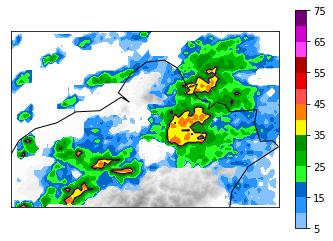
%matplotlib inline
out=IO.COMPREF_READ(compress_dir)
bm = Basemap(resolution='i',rsphere=(6370000.00,6370000.00),projection='lcc', llcrnrlon=121, urcrnrlon=122, llcrnrlat=24.8, urcrnrlat=25.4,lat_1 = 10., lat_2 = 40.,lon_0 = 121.76013, lat_0 = 24.128498)
pltwrf.terrain(bm,cmap='binary')
bm.contourf(out.lon,out.lat,out(),**out.cwbcolorbar(),latlon=True)
plt.colorbar()
CS=bm.contour(out.lon,out.lat,out(),[35],latlon=True)

bm.drawcoastlines()
[22]:
<matplotlib.collections.LineCollection at 0x7fcae09a36a0>
[23]:
from shapely.geometry import Polygon
poly_list=list()
for i in range(len(CS.collections[0].get_paths())):

    p = CS.collections[0].get_paths()[i]
    v = p.vertices
    x = v[:,0]
    y = v[:,1]
    try:
        poly = Polygon([(i[0], i[1]) for i in zip(x,y)])
        poly_list.append(poly)
    except:
         pass
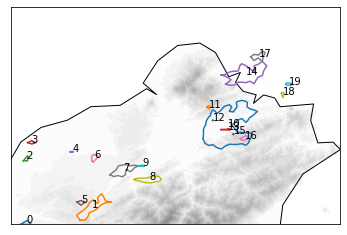
[24]:
fig,ax = plt.subplots()
bm = Basemap(resolution='i',projection='cyl', llcrnrlon=121, urcrnrlon=122, llcrnrlat=24.9, urcrnrlat=25.3)

bm = Basemap(resolution='i',rsphere=(6370000.00,6370000.00),projection='lcc', llcrnrlon=121, urcrnrlon=122, llcrnrlat=24.8, urcrnrlat=25.4,lat_1 = 10., lat_2 = 40.,lon_0 = 121.76013, lat_0 = 24.128498)

pltwrf.terrain(bm,cmap='binary')
for i in range(len(poly_list)):
    x,y=poly_list[i].exterior.xy
    aa=poly_list[i].centroid.coords[0]
    plt.annotate(str(i),xy=(aa))
    ax.plot(x,y)
bm.drawcoastlines()
[24]:
<matplotlib.collections.LineCollection at 0x7fcae1487da0>
[25]:
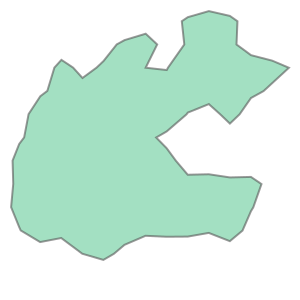
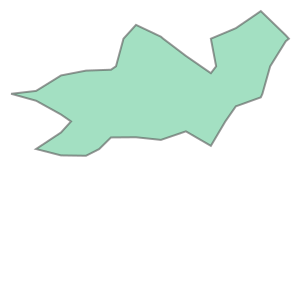
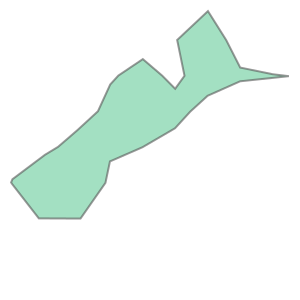
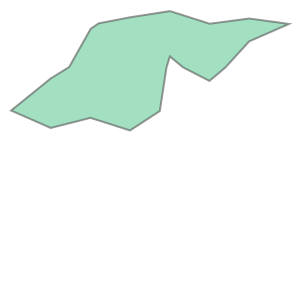
poly_list.sort(key=lambda x:x.area,reverse=True)
for i in range(4):
    display(poly_list[i])
[14]:
from IPython.display import HTML
HTML('<iframe src="https://drive.google.com/file/d/1M_P8ZfN6rv6txj1IT4d4RXWEezmSoPq-/preview" width="640" height="480" allow="autoplay"></iframe>')
[14]:
[ ]: